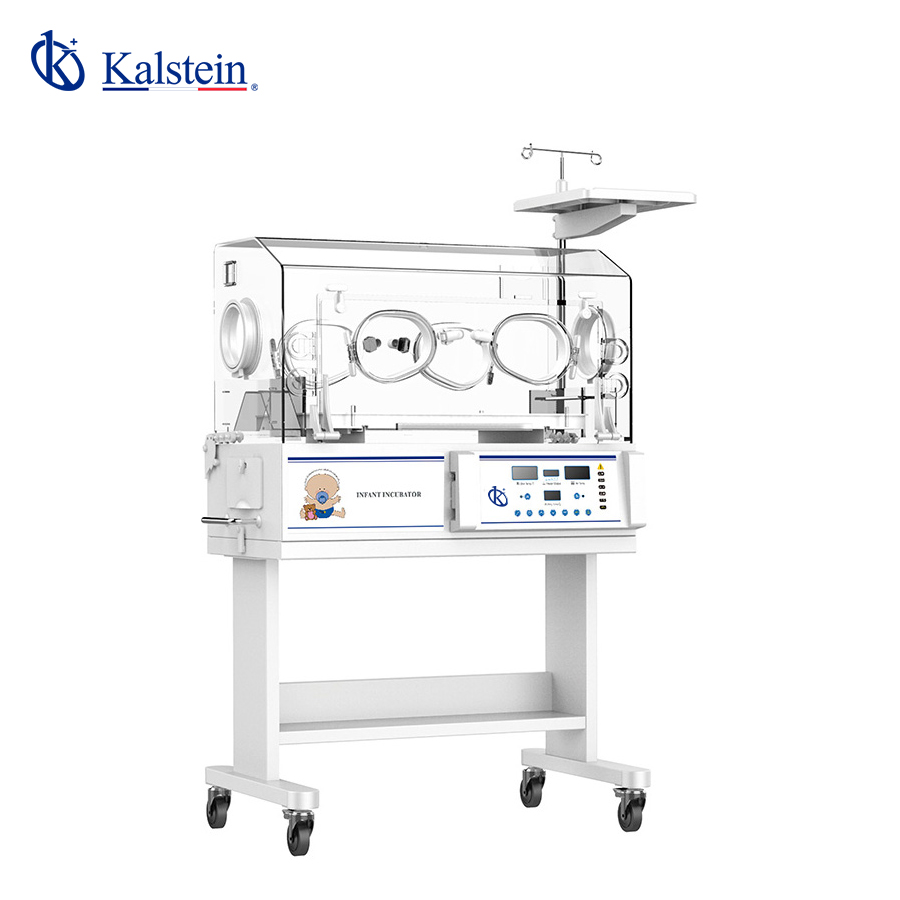
Troubleshooting Common Symptoms of the YR02183 Infant Phototherapy Incubator
The YR02183 Infant Phototherapy Incubator is designed to provide stable environments for newborns requiring phototherapy, especially for jaundice treatment. However, like any medical equipment, it may present challenges or malfunctions during use. This guide focuses on common symptoms, their probable causes, and solutions to ensure the optimal functioning of the YR02183.
Technical Specifications of YR02183
| Specification | Details |
|---|---|
| Model | YR02183 |
| Temperature Control for Air | Yes |
| Skin Temperature Control | Yes |
| Air Temperature Control at 37°C | Yes |
| Baby Bed Inclination | Yes |
| Humidity Display | Yes |
| Humidity Control | Yes |
| Upper Phototherapy Unit | Yes |
| Lower Phototherapy Unit | Yes |
| Side Door | Optional |
| Aluminum Heat Preservation Tank | Yes |
| Access Ports and Windows Operation | 1 Port, 4 Windows |
| Cabinet | Yes |
| Adjustable Working Height | Optional |
| Additional Rear Door | Optional |
| Baby Scale Bed | Optional |
| Silent DC Motor | Optional |
Common Symptoms and Troubleshooting Steps
As with any intricate medical device, the YR02183 might exhibit various symptoms that indicate potential issues. Below, we detail common symptoms that users may encounter, the probable causes, and the recommended corrective actions.
Equipment Does Not Power On
If the incubator does not power on, this can be alarming. Here are some potential causes and solutions:
- Cause: Power Connection Issues - Check that the power cord is securely plugged in.
- Solution: Ensure that the wall outlet is functional by testing it with another device.
- Cause: Faulty Power Supply - A malfunctioning power supply unit can prevent the incubator from turning on.
- Solution: Inspect the power supply for visible damage and replace if necessary.
Error Code E-03
Error codes can indicate specific problems. For E-03:
- Cause: Temperature Sensor Failure - This could mean a problem with the temperature probe.
- Solution: Test the temperature probe with a multimeter; replace if it fails the test.
Inconsistent Temperature Readings
Inconsistent readings can affect the treatment:
- Cause: Environmental Factors - Drafts or an unsuitable room temperature can cause fluctuations.
- Solution: Ensure the incubator is placed away from windows, doors, or air conditioning vents.
- Cause: Calibration Issues - The incubator may require recalibration.
- Solution: Refer to the calibration section of the user manual to recalibrate the unit.
Humidity Levels Not Stable
Stable humidity is critical for an incubator's performance:
- Cause: Blocked Humidity Sensor - Dust buildup can affect readings.
- Solution: Clean the humidity sensor and ensure it is functioning properly.
- Cause: Water Supply Issues - If the water tank is empty, humidity levels will drop.
- Solution: Regularly check and refill the water tank as necessary.
Symptom-Cause-Solution Matrix
| Symptom | Probable Cause | Solution |
|---|---|---|
| Equipment Does Not Power On | Power Connection Issues | Check the power cord and outlet |
| Equipment Does Not Power On | Faulty Power Supply | Inspect and replace the power supply if damaged |
| Error Code E-03 | Temperature Sensor Failure | Test and replace the temperature probe |
| Inconsistent Temperature Readings | Environmental Factors | Reposition the incubator away from drafts |
| Humidity Levels Not Stable | Blocked Humidity Sensor | Clean the sensor |
| Humidity Levels Not Stable | Water Supply Issues | Check and refill the water tank |
Frequently Asked Questions
What should I do if the YR02183 shows a temperature alarm?
If a temperature alarm is triggered, first verify the set temperature against the actual temperature readings. Ensure that the incubator is not exposed to external drafts. If the issue persists, check for potential sensor failure or calibration issues.
How often should I check the humidity levels in the YR02183?
The humidity levels should be checked daily, especially before placing a newborn in the incubator. Regular monitoring ensures that the humidity remains within the optimal range for infant care.
Can I use the YR02183 without the humidity feature?
While it is possible to use the incubator without the humidity feature, it is not recommended. Maintaining appropriate humidity levels is crucial for preventing dehydration in newborns.
What maintenance is required for the YR02183?
Regular maintenance includes checking the power and humidity systems, cleaning the sensors, and ensuring that the incubator is kept free of dust and debris.
How do I calibrate the YR02183 properly?
Calibration procedures can be found in the user manual, usually involving setting the incubator to standard temperatures and comparing readings to a calibrated thermometer.
Is there a warranty for the YR02183 model?
Yes, the YR02183 typically comes with a warranty covering manufacturing defects. It is advisable to check the warranty terms provided at the time of purchase.
Where can I find replacement parts for the YR02183?
Replacement parts can usually be sourced from authorized dealers or directly from manufacturers specializing in medical equipment. Ensure compatibility with the YR02183 model when ordering.
If you are looking for a fusion of innovation and quality, you have come to the right place. At Kalstein, we offer you the luxury of exploring our exclusive catalog of laboratory equipment. We manufacture every device to the highest standards of excellence. Our intuitive and seamless online purchasing channels are designed for your convenience, securing the most competitive prices. Hesitate no longer — we bring science to life, it is time to become part of our community.