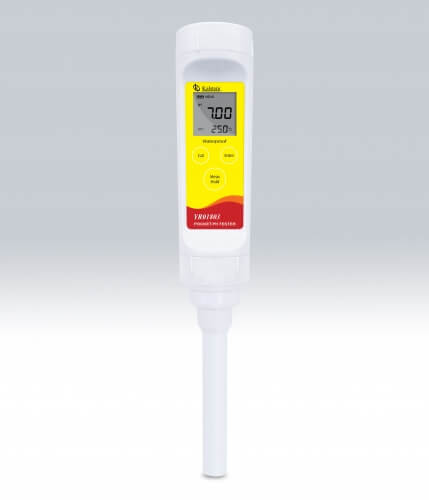
Troubleshooting Common Errors on the YR01803: A Comprehensive Guide
The YR01803 portable pH meter is an essential tool in various laboratory settings, offering high precision measurements with a dual display LCD and temperature compensation features. However, like any scientific instrument, it may encounter issues that can affect its functionality. This guide delves into common errors and troubleshooting techniques to ensure that the YR01803 continues to perform accurately.
Understanding the YR01803: Overview and Specifications
| Model | YR01803 |
|---|---|
| pH Range | -1.00 to 15.00 pH |
| Resolution | 0.01 pH |
| Accuracy | ± 0.01 pH |
| Calibration Points | 1 to 3 points |
| Temperature Range | 0 to 60 °C / 32 to 140 °F |
| Display | Dual-line LCD (21 × 21 mm) |
Common Symptoms and Troubleshooting Techniques
In this section, we will address common symptoms users may encounter with the YR01803 portable pH meter, outline probable causes, and provide step-by-step solutions.
Equipment Does Not Power On
A common issue is the YR01803 not powering on, which can be frustrating. Here are some probable causes and solutions:
- Cause: Dead batteries
- Solution: Replace the existing batteries with new, high-quality AAA batteries.
- Cause: Incorrect battery installation
- Solution: Ensure that the batteries are installed with the correct polarity.
Error Code E-03
Error code E-03 usually indicates calibration issues. Here is how to resolve it:
- Cause: Calibration points out of range
- Solution: Perform a fresh calibration using standard buffer solutions.
- Cause: Contaminated electrodes
- Solution: Clean the electrodes with distilled water and a soft cloth.
Inconsistent Readings
Inconsistent measurements can lead to erroneous results. Follow these steps:
- Cause: Improper electrode storage
- Solution: Store the electrode in a storage solution as per the manufacturer's instructions.
- Cause: Air bubbles in the sample
- Solution: Tap the meter gently to release trapped air bubbles before taking measurements.
Symptoms to Solutions: A Quick Reference Table
| Symptom | Probable Cause | Recommended Solution |
|---|---|---|
| Equipment Does Not Power On | Dead batteries | Replace batteries |
| Error Code E-03 | Calibration points out of range | Recalibrate with buffer solutions |
| Inconsistent Readings | Improper electrode storage | Store in proper solution |
Understanding pH Meter Calibration
Calibration is critical for ensuring the accuracy of the YR01803. The device can be calibrated at one to three points using standard buffer solutions, including NIST and US buffer solutions. Follow these steps for effective calibration:
- Turn on the YR01803 and select the calibration option.
- Immerse the electrode in the first buffer solution and allow it to stabilize.
- Press the confirm button to set the first calibration point.
- Repeat for additional buffer solutions as necessary.
Maintenance Tips for Longevity
Regular maintenance is key to keeping the YR01803 in optimal condition. Here are some maintenance tips:
- Clean the electrodes regularly to prevent contamination.
- Store the meter in a protective case when not in use.
- Check battery levels frequently and replace as needed.
Frequently Asked Questions
What should I do if the YR01803 displays an error code?
If the YR01803 displays an error code, refer to the troubleshooting section of this guide. Common error codes include E-03 for calibration issues. Performing a recalibration usually resolves the issue.
How can I ensure accurate pH readings with the YR01803?
For accurate readings, regularly calibrate the meter with standard buffer solutions and ensure the electrodes are clean and properly maintained. Follow the calibration procedure detailed in this guide.
What types of buffer solutions are compatible with the YR01803?
The YR01803 is compatible with NIST and US standard buffer solutions, such as pH 4.01, 6.86, and 10.01. Always use quality buffer solutions for the best results.
How often should the YR01803 be calibrated?
The YR01803 should be calibrated before each use, especially if measurements are taken in varying conditions or if the device has not been used for an extended period.
What is the lifespan of the YR01803?
The expected lifespan of the YR01803 depends on usage and maintenance but typically lasts several years with proper care and regular battery replacement.
Can I replace the electrode of the YR01803?
Yes, the electrode is designed to be replaceable. Refer to your user manual for specific instructions on how to replace the electrode safely.
If you are looking for a fusion of innovation and quality, you have come to the right place. At Kalstein, we offer you the luxury of exploring our exclusive catalog of laboratory equipment. We manufacture every device to the highest standards of excellence. Our intuitive and seamless online purchasing channels are designed for your convenience, securing the most competitive prices. Hesitate no longer — we bring science to life, it is time to become part of our community.