Troubleshooting Common Errors of the YR0231 Microscope: A Practical Guide
The YR0231 microscope is a sophisticated piece of laboratory equipment designed for versatility in various applications, from clinical diagnostics to educational purposes. However, like any advanced instrument, it can encounter issues that may hinder its performance. This guide focuses on troubleshooting common errors of the YR0231 microscope through its symptoms, providing practical and actionable solutions for users.
Understanding the YR0231 Microscope
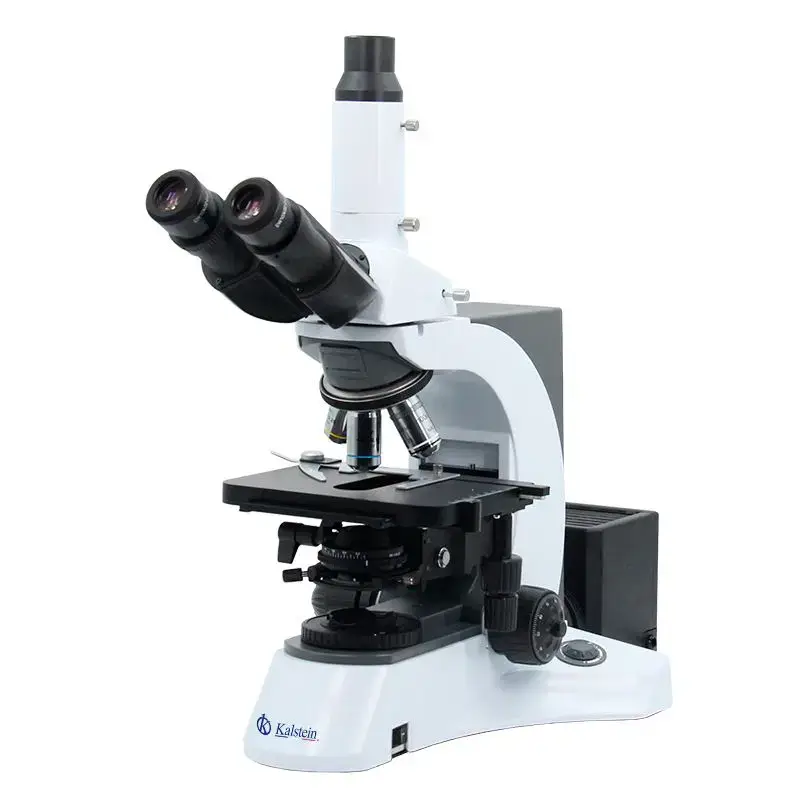
The YR0231 microscope features a Seidentopf trinocular head with a 30° inclination, a five-position revolving nosepiece, and Infinity Plan objectives (4x, 10x, 40x, and 100x). It is equipped with a mechanical stage offering a travel range of 55 x 75 mm, a variable NA0.9/0.25 condenser, and an adjustable halogen lamp for optimal illumination. Understanding its specifications is crucial for effective troubleshooting.
Technical Specifications of the YR0231
| Model | YR0231 |
|---|---|
| Optical System | Infinity Plan System |
| Function | Bright field, optional dark field, polarization, phase contrast, fluorescence |
| Head | Seidentopf trinocular head, inclined 30°, rotatable 360°, interpupillary 48-75 mm |
| Eyepiece | Extra wide field eyepiece EW10x/22 mm |
| Nosepiece | Five-position revolving nosepiece |
| Objective | Infinity Plan achromatic objectives: 4x, 10x, 40x, 100x |
| Focusing | Coaxial coarse and fine adjustment, focus range 24 mm |
| Stage | Double-layer mechanical stage, 185 x 142 mm |
| Condenser | NA0.9/0.25 adjustable condenser |
| Illumination | 6V30W halogen lamp with adjustable brightness |
Troubleshooting by Symptom
This section categorizes common errors encountered with the YR0231 microscope based on symptoms. Each symptom is followed by probable causes and suggested solutions.
Equipment Does Not Power On
When the YR0231 microscope fails to power on, the issue could be related to the power supply, connections, or internal components.
Probable Causes
- Faulty power cord or plug
- Blown fuse
- Internal circuit failure
Solution Steps
- Check the power cord for any visible damage.
- Replace the fuse in the plug if necessary.
- If the issue persists, consult a technician for internal inspection.
Error Code E-03 Displayed
An E-03 error code on the YR0231 typically indicates an issue with the illumination system.
Probable Causes
- Bulb failure
- Improper lamp installation
- Faulty power supply to the lamp
Solution Steps
- Replace the halogen bulb with a new one.
- Ensure that the bulb is properly seated in its socket.
- Check the power supply connections to the lamp.
Inconsistent Readings
Inconsistent readings from the YR0231 microscope can greatly affect the quality of observations.
Probable Causes
- Dirty optics
- Improper calibration
- Incorrect objective lens selection
Solution Steps
- Clean the lenses and optical surfaces with appropriate lens cloth.
- Calibrate the microscope according to the manufacturer's guidelines.
- Verify that the correct objective lens is being used for the sample.
Symptoms and Solutions Table
| Symptom | Probable Causes | Suggested Solutions |
|---|---|---|
| Equipment Does Not Power On | Faulty power cord, blown fuse, internal failure | Check power cord, replace fuse, consult technician |
| Error Code E-03 | Bulb failure, improper installation, faulty power supply | Replace bulb, check installation, inspect power supply |
| Inconsistent Readings | Dirty optics, improper calibration, incorrect lens | Clean optics, calibrate, verify lens selection |
Frequently Asked Questions
What should I do if my YR0231 microscope is displaying an error code?
If your YR0231 microscope displays an error code, consult the user manual for specific troubleshooting steps related to that code. Common errors include power issues or lamp failures, which often have straightforward solutions.
How can I maintain the YR0231 microscope?
Regular maintenance includes cleaning the optical components, checking the alignment of the optics, and ensuring that the mechanical stage moves smoothly. Additionally, check the power supply connections periodically to avoid interruptions.
Are there any optional accessories for the YR0231 microscope?
Yes, the YR0231 microscope has several optional accessories including additional objective lenses, eyepiece options, and specialized filters for different applications. Check the specifications for compatibility and enhancements.
How do I clean the optical surfaces of the YR0231 microscope?
Use a soft, lint-free optical cloth or lens paper to gently wipe the lenses. If needed, slightly moisten the cloth with lens cleaning solution specifically designed for optics. Avoid using harsh chemicals.
What are the common causes of a blown bulb in the YR0231 microscope?
A blown bulb can result from electrical surges, prolonged use beyond the bulb's lifespan, or improper installation. Regularly check and replace bulbs according to the manufacturer's recommendations to prevent such issues.
Can I use the YR0231 microscope for fluorescence microscopy?
Yes, the YR0231 microscope is equipped with options for fluorescence microscopy. Ensure that you have the appropriate filters and light source for accurate fluorescent imaging.
Conclusion
By understanding the common errors and their troubleshooting steps for the YR0231 microscope, operators can maintain optimal performance and longevity of the equipment. Should you require further assistance or wish to explore our offerings, feel free to request a quote.
If you are looking for a fusion of innovation and quality, you have come to the right place. At Kalstein, we offer you the luxury of exploring our exclusive catalog of laboratory equipment. We manufacture every device to the highest standards of excellence. Our intuitive and seamless online purchasing channels are designed for your convenience, securing the most competitive prices. Hesitate no longer — we bring science to life, it is time to become part of our community.