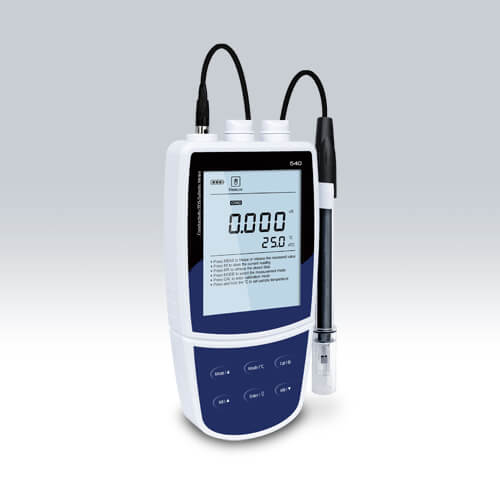
Installation and Startup Guide for the Portable Conductivity Meter YR01818-2
The Portable Conductivity Meter YR01818-2 is a professional-grade device designed for measuring conductivity, TDS, and salinity with precision. This guide aims to provide a detailed approach to installing and setting up the device efficiently.
Understanding the YR01818-2
The YR01818-2 Portable Conductivity Meter is equipped with advanced features, including a backlit LCD display, multi-point calibration, and automatic temperature compensation. Understanding its components is vital for effective installation and operation.
Unboxing Checklist
Before starting the installation, ensure that the following components are included in the box:
- YR01818-2 Conductivity Meter
- Standard conductivity solutions (10µS, 84µS, 1413µS, 12.88mS, 111.8mS)
- Conductivity electrode CON-0.1
- Temperature probe TP-10K
- USB communication interface cable
- User manual
Installation Steps
Follow these steps for proper installation:
- Location Selection: Place the meter on a stable, flat surface away from direct sunlight and high humidity.
- Power Supply: The YR01818-2 can be powered by three AA batteries, a DC adapter, or via USB. Choose your preferred power source.
- Connect Probes: Attach the conductivity electrode and temperature probe to the meter securely.
- Configure Settings: Power on the device and navigate to the settings menu to configure calibration points, stability criteria, and temperature units.
- Calibration: Perform a multi-point calibration using the standard solutions provided, following the prompts on the display.
First Measurement Validation
After installation and calibration, it’s essential to validate the first measurement:
- Dip the electrode into the calibration solution.
- Wait for the reading to stabilize, indicated by a steady display.
- Compare the reading with the expected value of the solution.
Common Setup Mistakes
Below are some common mistakes to avoid:
- Not properly securing the probes before taking measurements.
- Using an incorrect power supply which might damage the meter.
- Skipping the calibration step, which is crucial for accurate readings.
Technical Specifications
| Model | YR01818-2 |
|---|---|
| Conductivity Range | 0.01 to 20.00, 200.0, 2000µS/cm; 20.00, 200.0mS/cm |
| Resolution | 0.001, 0.01, 0.1, 1 |
| Accuracy | ±0.5% F.S. |
| Calibration Points | 1 to 5 points |
| Temperature Range | 0 to 105°C / 32 to 221°F |
| Power Supply | 3 AA batteries or DC 5V adapter |
| Dimensions | 170(L)×85(W)×30(H)mm |
| Weight | 300g |
Frequently Asked Questions
What are the key features of the YR01818-2 Portable Conductivity Meter?
The YR01818-2 offers TDS, salinity, and resistivity measurement modes, with a high precision of 0.5% F.S. It supports calibration from 1 to 5 points and features an automatic temperature compensation function for accurate results.
How do I calibrate the YR01818-2?
Calibration involves using standard solutions to ensure the meter provides accurate readings. Access the calibration menu and follow the on-screen instructions to perform a multi-point calibration.
Can I use the YR01818-2 for seawater testing?
Yes, the YR01818-2 is suitable for measuring salinity in seawater, with a specific range that allows for accurate readings in marine applications.
What power options are available for the YR01818-2?
The meter can be powered using three AA batteries, a DC power adapter, or through a USB connection, offering flexibility for different environments.
What should I do if the meter shows an error code?
Error codes may indicate calibration issues, probe problems, or other malfunctions. Refer to the user manual for specific troubleshooting steps based on the error code displayed.
How can I transfer data from the YR01818-2 to a PC?
The device features a USB communication interface, allowing you to connect it to a PC for data transfer easily. Use compatible software to manage and analyze the data.
What is the expected lifespan of the YR01818-2?
With regular maintenance and proper use, the YR01818-2 can provide reliable service for several years. Regular calibration and use of compatible accessories will extend its lifespan significantly.
Request a quote on Kalstein Plus today to explore how the YR01818-2 Portable Conductivity Meter can meet your laboratory needs.
If you are looking for a fusion of innovation and quality, you have come to the right place. At Kalstein, we offer you the luxury of exploring our exclusive catalog of laboratory equipment. We manufacture every device to the highest standards of excellence. Our intuitive and seamless online purchasing channels are designed for your convenience, securing the most competitive prices. Hesitate no longer — we bring science to life, it is time to become part of our community.