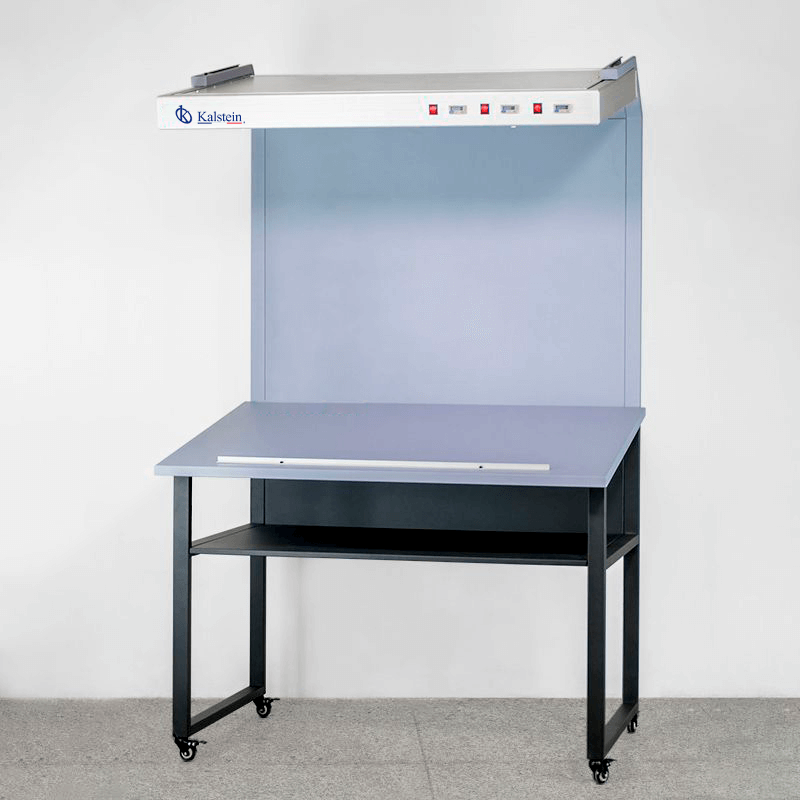
Installation and Commissioning Guide for the YR05536 Color Test Station Light Box
The YR05536 Color Test Station Light Box is an essential tool in various industries, including printing and furniture manufacturing, where precise color matching is crucial. This guide provides a detailed overview of the installation and commissioning processes to ensure optimal performance.
Introduction to the YR05536 Color Test Station
The YR05536 is designed to evaluate color consistency and product quality under various lighting conditions. With its capabilities to provide D65, D50, and U30 light sources, the YR05536 facilitates accurate color inspections by simulating how colors appear under different lighting scenarios. This guide will help you navigate the installation and initial setup processes effectively.
Technical Specifications of the YR05536
| Model | YR05536 | YR05537 | YR05538 |
|---|---|---|---|
| Light Tubes | D65 6500K 36W | D65 6500K 36W, D50 5000K 36W | D65 6500K 36W, D50 5000K 36W, U30 3000K 36W |
| Power Supply | AC220V 50HZ | AC220V 50HZ | AC220V 50HZ |
| Table Size (cm) | 135*90 | 135*90 | 135*90 |
| Dimensions (cm) | 135*99*217 | 135*99*217 | 135*99*217 |
Unboxing and Initial Setup Checklist
Before beginning the installation, make sure you have all the components required for the YR05536 Color Test Station Light Box. Follow this unboxing checklist:
- YR05536 Color Test Station Light Box
- Power Cable
- User Manual
- Light Tubes (D65, D50, U30)
- Mounting Hardware (if applicable)
- Calibration Tools
Anchoring and Leveling the Light Box
Proper anchoring and leveling are crucial for the accurate performance of the YR05536. Follow these steps for installation:
- Select a stable and flat surface to place the light box. Ensure that the surface can support the weight of the unit.
- Using a level, adjust the feet of the light box to ensure it is perfectly level from all sides.
- If applicable, use the provided mounting hardware to secure the light box to the surface.
Power-Up Sequence and Initial Calibration
Power-Up Sequence
Once the light box is properly set up, follow these steps to power it on:
- Connect the power cable to the unit and plug it into a suitable power outlet.
- Press the power button to turn on the light box.
- Allow the unit to warm up for a few minutes before calibration.
Initial Calibration
Calibration is critical for ensuring accurate color representation. To calibrate the YR05536:
- Access the calibration settings via the control panel.
- Follow the prompts to select the desired light source (D65, D50, U30).
- Use the provided calibration tools to adjust the settings based on the manufacturer’s specifications.
Common Installation Mistakes to Avoid
Being aware of common pitfalls can save time and enhance the setup experience. Here are some mistakes to avoid:
- Ignoring the leveling process, which can lead to inaccurate results.
- Connecting to an unstable power source, which can damage the equipment.
- Failing to calibrate the unit before first use, leading to incorrect color readings.
Maintenance and Replacement of Light Sources
Maintaining the light sources is essential for the long-term functionality of the YR05536. Follow these guidelines:
- Regularly check the condition of the light tubes; replace them if discoloration or blackening occurs.
- Keep track of the operating hours for each light source to determine optimal replacement intervals.
- Use only compatible light tubes as specified in the user manual to ensure performance accuracy.
Frequently Asked Questions
What are the primary applications of the YR05536 Color Test Station Light Box?
The YR05536 is commonly used in industries such as printing, furniture manufacturing, and paint production for color matching and quality control tasks.
How do I replace the light tubes in the YR05536?
To replace the light tubes, turn off the unit and unplug it. Carefully remove the old tubes by following the instructions in the user manual, and install the new tubes securely.
What should I do if the YR05536 does not power on?
If the unit does not power on, check the power connections, ensure the outlet is functioning, and inspect for any blown fuses or tripped circuit breakers.
How do I ensure accurate color matching using the YR05536?
To ensure accurate color matching, calibrate the unit regularly and use the correct light sources based on the requirements outlined in the user manual.
Can the YR05536 be used in outdoor environments?
No, the YR05536 is designed for indoor use only. Exposure to outdoor elements can compromise its performance and lead to damage.
How often should the YR05536 undergo maintenance?
Regular maintenance should be conducted every six months, including checking light tubes and calibration settings to ensure optimal performance.
Is there a warranty for the YR05536 Color Test Station Light Box?
Yes, the YR05536 typically comes with a warranty that covers manufacturing defects. Refer to the warranty documentation for detailed terms and conditions.
If you have any questions or require a quote, please reach out for assistance.
If you are looking for a fusion of innovation and quality, you have come to the right place. At Kalstein, we offer you the luxury of exploring our exclusive catalog of laboratory equipment. We manufacture every device to the highest standards of excellence. Our intuitive and seamless online purchasing channels are designed for your convenience, securing the most competitive prices. Hesitate no longer — we bring science to life, it is time to become part of our community.