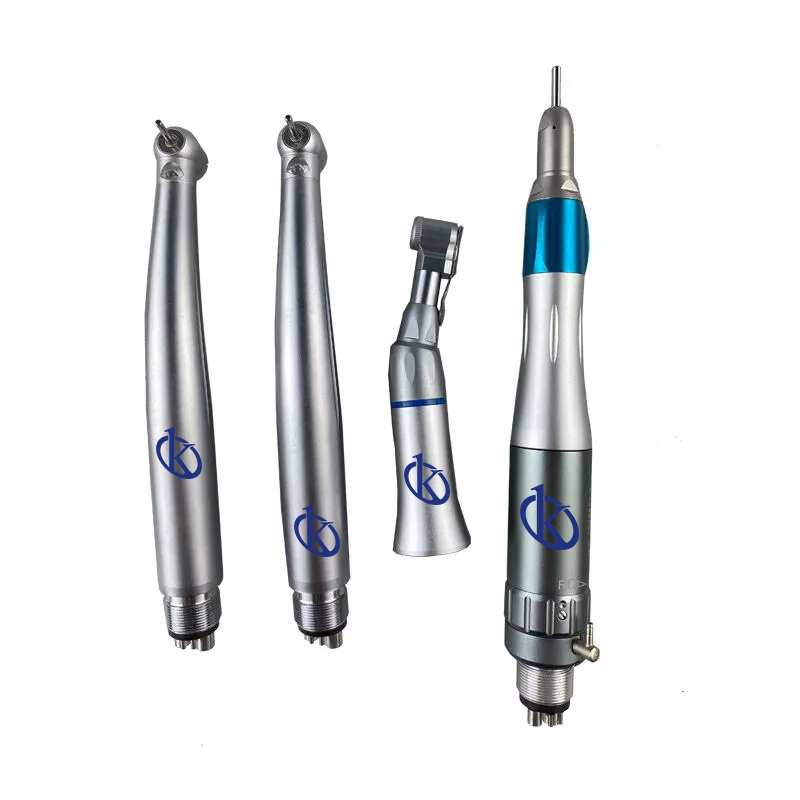
Installation and Commissioning Guide for Dental Accessory YR06012-OP10
The YR06012-OP10 dental accessory is a crucial component in modern dental practices, facilitating a variety of procedures with advanced technology. This guide aims to provide a detailed overview of the installation and commissioning process for the YR06012-OP10. Whether you are setting up a new dental clinic or upgrading an existing one, understanding the proper procedures for installation is essential for optimal performance.
Understanding the YR06012-OP10
The YR06012-OP10 is designed to enhance the capabilities of dental practices, providing tools necessary for various dental procedures. This model includes a comprehensive set of 110 handpieces, making it adaptable for different dental treatments. Knowing its components and operational parameters is key to ensuring proper installation.
Technical Specifications of YR06012-OP10
| Model | Brand | Category | Price USD | Gross Weight | Dimensions |
|---|---|---|---|---|---|
| YR06012-OP10 | Kalstein | Dental Accessories | $110.00 | 0 kg | x x |
Unboxing and Initial Setup
Upon receiving the YR06012-OP10, carefully unbox the unit and check for all components listed in the inventory. Ensure that the following items are included:
- Handpiece set
- Operation manual
- Power adapter
- Mounting hardware
Inspect the equipment for any signs of damage during transit. If any components are missing or damaged, contact your supplier immediately before proceeding.
Mounting the YR06012-OP10
Choose an appropriate location in your dental practice that meets the following requirements:
- Accessibility for both dental staff and patients
- Stable surface for mounting the equipment
- Proximity to electrical outlets
Securely mount the YR06012-OP10 according to the included instructions. Ensure it is leveled and anchored properly to avoid movement during use. This step is critical for maintaining alignment and functionality.
Power-Up Sequence and Calibration
After installation, connect the power adapter and turn the unit on, following these steps:
- Ensure that all cables are securely connected.
- Press the power button and observe the startup sequence.
- Allow the unit to complete its self-diagnostic checks.
- Follow the prompts on the display for initial calibration settings.
Calibration is crucial for ensuring the accuracy of the YR06012-OP10 in clinical applications. Refer to the manual for specific calibration procedures.
Common Installation Mistakes to Avoid
Several common pitfalls can occur during the installation process. Be mindful of the following:
- Improper mounting that can lead to instability.
- Neglecting to follow the power-up sequence, which can disrupt calibration.
- Overlooking the required environmental conditions such as temperature and humidity.
Avoiding these mistakes will contribute to a successful installation and operation of the YR06012-OP10.
Environmental Conditions for Optimal Performance
For the YR06012-OP10 to function correctly, specific environmental conditions must be maintained:
- Temperature range: 20-25°C
- Relative humidity: 30-60%
- Electrical supply: 110-240V, 50/60Hz
Ensure that the installation site is free from excessive vibrations and electromagnetic interference to avoid operational issues.
Frequently Asked Questions
What are the key features of the YR06012-OP10 dental accessory?
The YR06012-OP10 includes a comprehensive set of 110 dental handpieces, designed to accommodate a variety of dental procedures efficiently. It also has advanced connectivity features for easy integration into dental practice workflows.
How do I troubleshoot if the YR06012-OP10 does not power on?
If the YR06012-OP10 does not power on, check the following:
- Ensure that the power supply is connected properly.
- Verify that the outlet is functioning by testing with another device.
- Inspect the power cable for damage.
Should these steps fail, refer to the service manual for detailed troubleshooting instructions.
What is the warranty period for the YR06012-OP10?
The warranty period for the YR06012-OP10 is typically one year from the date of purchase, covering manufacturing defects and ensuring peace of mind for dental practices.
How often should I calibrate the YR06012-OP10?
Calibration of the YR06012-OP10 should be performed at least once every six months to ensure accuracy and reliability in dental procedures. It is recommended to follow the calibration guidelines provided in the user manual.
Are there any specific cleaning procedures for the YR06012-OP10?
Cleaning the YR06012-OP10 involves using soft cloths and non-abrasive cleaners. Regular maintenance is crucial to keep the unit hygienic and operational. Refer to the maintenance section of the manual for detailed procedures.
What accessories are compatible with the YR06012-OP10?
The YR06012-OP10 is compatible with various dental handpieces and tools. A detailed compatibility list can be found in the product manual, specifying compatible models and accessories.
How can I request a quote for the YR06012-OP10?
You can request a quote for the YR06012-OP10 through our dedicated channels or contact our sales team directly for personalized assistance.
If you are looking for a fusion of innovation and quality, you have come to the right place. At Kalstein, we offer you the luxury of exploring our exclusive catalog of laboratory equipment. We manufacture every device to the highest standards of excellence. Our intuitive and seamless online purchasing channels are designed for your convenience, securing the most competitive prices. Hesitate no longer — we bring science to life, it is time to become part of our community.