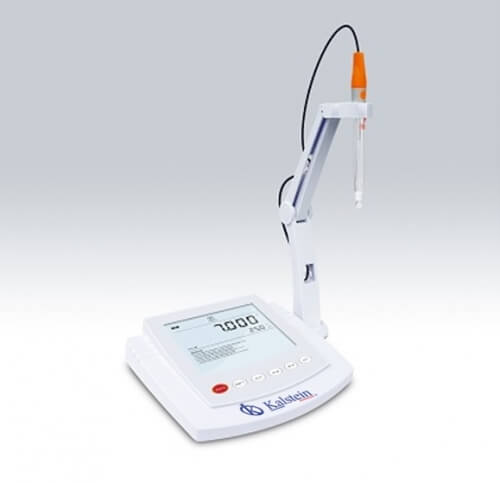
Common Errors and Troubleshooting for the YR01823-2 pH Meter
The YR01823-2 pH Meter is a precision desktop device designed for high accuracy in various laboratory settings. However, like any sophisticated equipment, it may encounter issues that can hinder its performance. Understanding these common errors and their troubleshooting techniques can enhance operational efficiency and accuracy. This article delves deep into the common symptoms users may experience with the YR01823-2 pH Meter, provides probable causes, and offers concrete solutions for effective troubleshooting.
Technical Specifications of YR01823-2 pH Meter
| Technical Specification | Details |
|---|---|
| Model | YR01823-2 |
| pH Range | -2.000 to 20.000 pH |
| Resolution | 0.001, 0.01, 0.1 pH, selectable |
| Accuracy | ± 0.002 pH |
| Calibration Points | 1 to 5 points |
| Buffer Options | USA, NIST, DIN, 2 custom buffers |
| Temperature Compensation | 0 to 100 °C / 32 to 212 °F, manual or automatic |
| Memory | Stores up to 500 data sets |
| Dimensions | 210 (length) × 188 (width) × 60 (height) mm |
| Weight | 1.5 kg |
| Power Supply | DC5V, using AC adapter, 220V / 50Hz |
Common Symptoms and Troubleshooting Steps
Equipment Does Not Power On
If the YR01823-2 pH Meter does not power on, check the following:
- Power Supply Issues: Ensure that the AC adapter is correctly connected and functional. Test with another device if necessary.
- Faulty Connection: Inspect the power cord for any visible damage. Replace if necessary.
- Internal Issues: If the unit still does not power on, it may require professional servicing.
Error Code E-03
Error code E-03 typically indicates a problem with the electrode. Follow these steps:
- Check Electrode Condition: Inspect the pH electrode for any signs of wear and tear. It may need replacement if damaged.
- Recalibration: Attempt to recalibrate the device, which may resolve the error.
- Temperature Compensation: Ensure that temperature compensation is set correctly for accurate measurements.
Inconsistent Readings
Inconsistent readings can lead to inaccurate data. Troubleshoot by considering the following:
- Calibration Status: Ensure that the meter is calibrated correctly before use. Use fresh buffer solutions for calibration.
- Electrode Maintenance: Clean the electrode according to the manufacturer's guidelines, as buildup can affect readings.
- Sample Temperature: Ensure that the sample temperature is within the specified limits for accurate readings.
Calibration Alarm Triggered
The calibration alarm indicates that the meter needs calibration. Address this by:
- Regular Calibration: Follow the calibration schedule to maintain accuracy.
- Buffer Solutions: Use appropriate buffer solutions during calibration to ensure reliability.
Common Troubleshooting Solutions Table
| Symptom | Probable Cause | Solution |
|---|---|---|
| Equipment does not power on | Power supply issues | Check power connections and replace faulty components. |
| Error code E-03 | Electrode failure | Inspect and possibly replace the electrode; recalibrate. |
| Inconsistent readings | Calibration issues | Recalibrate using fresh buffer solutions. |
| Calibration alarm triggered | Calibration overdue | Calibrate the meter regularly according to schedule. |
Frequently Asked Questions
What should I do if my YR01823-2 pH Meter displays an error message?
Refer to the user manual for specific error codes. Common solutions include recalibrating the device, checking electrode connections, or replacing the electrode if necessary.
How often should I calibrate the YR01823-2 pH Meter?
Calibration frequency depends on usage. Regular calibration is recommended, especially before critical measurements. A general guideline is to calibrate after every 10 uses or once a week.
Can I use custom buffer solutions with the YR01823-2 pH Meter?
Yes, the YR01823-2 allows for the use of custom buffer solutions, in addition to standard buffers. Ensure they are of known pH value for accurate calibration.
How can I maintain the electrode of my YR01823-2 pH Meter?
To maintain the electrode, store it in storage solution when not in use, avoid exposure to air, and clean it following the manufacturer’s instructions to prevent buildup.
What is the recommended operating temperature range for the YR01823-2 pH Meter?
The YR01823-2 operates effectively in a temperature range of 0 to 105 °C / 32 to 221 °F. Operating outside this range may result in inaccurate readings.
Where can I find replacement parts for the YR01823-2 pH Meter?
Replacement parts can typically be sourced from the manufacturer or authorized distributors. Always ensure that you are purchasing genuine parts for optimal performance.
How do I request a quote for the YR01823-2 pH Meter?
To request a quote, please reach out to our sales team through our online channels or contact us directly for assistance.
If you are looking for a fusion of innovation and quality, you have come to the right place. At Kalstein, we offer you the luxury of exploring our exclusive catalog of laboratory equipment. We manufacture every device to the highest standards of excellence. Our intuitive and seamless online purchasing channels are designed for your convenience, securing the most competitive prices. Hesitate no longer — we bring science to life, it is time to become part of our community.